How do I build a second brain?
Details
- Published
- Language
- English
- Reading
- 4 min
What a second brain is, how I build mine in Obsidian, and how I hand it to Claude Code or Codex as context instead of explaining everything from scratch.
Lately everyone is building agents and AI tools. Some do it to learn, some for fun, and some to ride the hype while it lasts.
I hope it does not end like the dot-com bubble, that rush for internet companies that burst in 2000 and took a lot of them down with it.
Sorry, I got sidetracked. I just wanted to throw a little horror in there.
I want to keep up, more out of curiosity than obligation (I'm a nerd). But I also have work to do and side projects to move forward. So I need a way to handle all that information without getting lost or relying on my memory.
My answer: a second brain.
What the hell is a second brain?
Well, it's a brain. A second one. The end.
Kidding.
It is a system for storing and finding what you learn, think and need, without having to remember all of it.
Tiago Forte popularized the method, and he proposes working with CODE: capture, organize, distill and express. In other words: save what is useful, give it a place, pull out what matters and use it to make something. He explains it here.
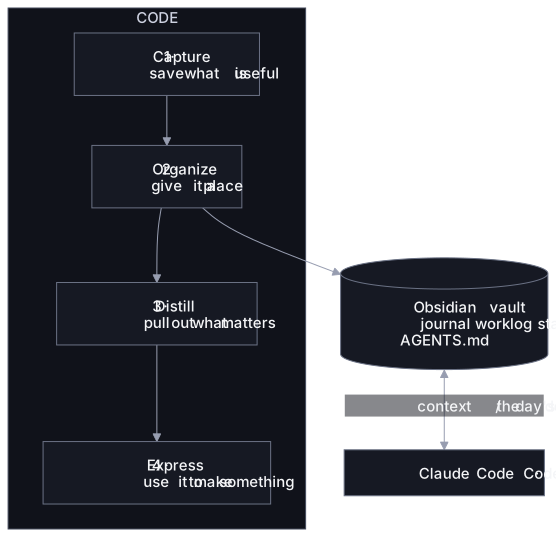
The interesting part is combining it with agents. If your ideas, decisions and criteria are written down, you can hand them over as context instead of explaining everything from scratch every time.
Where do I keep it? Obsidian
I do not want to build and maintain my own AI harness, meaning the structure that coordinates the agent, its tools and its context. I would rather use tools that already have teams behind them keeping them alive. I mostly use Claude, with one addition: Obsidian.
Obsidian, created by Shida Li and Erica Xu, is an app for writing and linking notes. It stores them as Markdown (.md) files in local folders. This is how it stores your notes.
That folder is called a vault: it holds your notes and the settings for that space. What a vault is.
There are a few ways to organize it:
- PARA, to separate projects, areas, resources and archives.
- Zettelkasten, to connect ideas through small notes.
- Daily notes linked to each other, if you want something simple.
Try them, mix them and keep whatever you can actually maintain. In the end it comes down to taste.
How do I connect it to an agent?
This is the part most people skip. Since the vault is just a folder of .md files, the agent can read it like any other project:
- You open Claude Code or Codex inside the vault folder, and it already has access to your notes.
- Or you connect it through an MCP server, if you want to use it from other apps.
The important bit: you decide which folders the agent sees and what it can edit.
How do I start?
If you have been using an agent for a while and it already has context about you, ask it to help you set up a first structure based on how you work, which decisions you keep repeating and what you look up often. If it does not, you give it that context as you go.
But start small. One or two folders, or however many you really need. Something you can remember and maintain yourself.
Because generating files is ridiculously easy. Keeping them useful is another story.
I see a lot of people generating .md files without paying much attention to them. Then they never read them, never update them, and end up piling up instructions that are repeated, outdated or contradictory. That is when the agent is more likely to get confused, and so are you.
What does mine look like?
Something like this, for example:
my-vault/
├── AGENTS.md
├── journal/
├── worklog/
│   └── 2026-10-28.md
└── standards/
└── coding.mdjournal/: only I keep this one. It is personal.worklog/: one note per workday. I write down what I do, the problems I run into and the decisions I make.standards/: my coding rules. I did not write them all by hand and I do not update them often, but I do read and review what ends up there. If several related standards fit in one file, even better. There is no need to chase ten documents.
What's next: a harness from my notes
Right now I am exploring a more agentic way to use it: defining instructions and workflows from the notes themselves. For example, an AGENTS.md at the root of the vault:
# Instructions for agents

## Context
- Read `standards/coding.md` before writing code.
- Check today's note in `worklog/` to see what I am working on.

## Rules
- Do not edit `journal/`. It is mine alone.
- If you make a technical decision, write it in today's worklog with the reason why.
Codex reads AGENTS.md directly. Claude Code uses CLAUDE.md, which can point to the same file with a single line: @AGENTS.md. That way I keep one source of instructions.
It is a small harness of my own, flexible, that I keep building as I need it.
In the end, I want to be able to come back to an idea, understand why I made a decision and keep working without rebuilding everything from memory.
Do that, and you will notice a big difference working with agents.
Bye!
This note is also available in Spanish.