I almost skipped the Herdr app. Then I built a layout for it
Details
- Published
- Language
- English
- Reading
- 4 min
Herdr began in the terminal, and I doubted its desktop app. Then I built Herdsidian, a layout that puts my Obsidian vault beside my agents.
Your coding agent is working in one window. The note that tells it how your project works is open in another.
You want it to read that note, so you switch apps, find the file, copy the path, switch back and paste. Then you do it again for the next note.
My notes and my agents lived like that, one window apart. I closed the gap with a layout for an app I almost did not try.
Where Herdr started
First, so nobody gets confused: Herdr is not mine. Its team builds it. I am a user who likes it, and Herdsidian is an add-on I built on top.
Herdr started in the terminal. Its site calls that tool Herdr TUI and describes it as "the original Herdr". I wrote about running it in September.
Then came the desktop app, a new and separate program built on herdr-core. That is a small server on your machine that runs every terminal and agent, so you can close the window and they keep working.
The two do not share agents. What runs in the TUI does not show up in the app, and the TUI keeps working on its own.
Why I almost skipped it
At first the app did not convince me. I like Herdr a lot, though, so I gave it a chance, and I loved it.
That is only my taste, and I have no benchmark to show you. The part I like most you can check yourself.
What changed: the window is files
In most apps, customizing stops at the colors. Herdr keeps its layout, sidebar, tabs, keys and themes as plain files in ~/.config/herdr-app, and the window redraws itself from them while it runs. Change a layout or a key, and the window follows within a second.
The default interface gets no special treatment. The spaces sidebar, the agents list and the tab bar are built from the same parts you get.
An AGENTS.md in that folder explains all of it to your agent. Want a sidebar of your PRs? You ask, and the agent writes it.
For me, that is the best part. It is more customizable and easier to edit, and that leaves room for creativity and for getting more done.
It has limits. Panels are mods, JavaScript that describes native GPUI elements, so HTML, CSS and web views are out. And the layouts and mods Herdr ships are Herdr's: to change their structure, you clone them first.
Why I built my own layout
I work from notes. I keep an Obsidian vault as a second brain: one note per workday with what I did, the problems I ran into and the decisions I made, plus my coding standards and instructions for my agents.
That vault is how I manage them. They read it, and they write back to it.
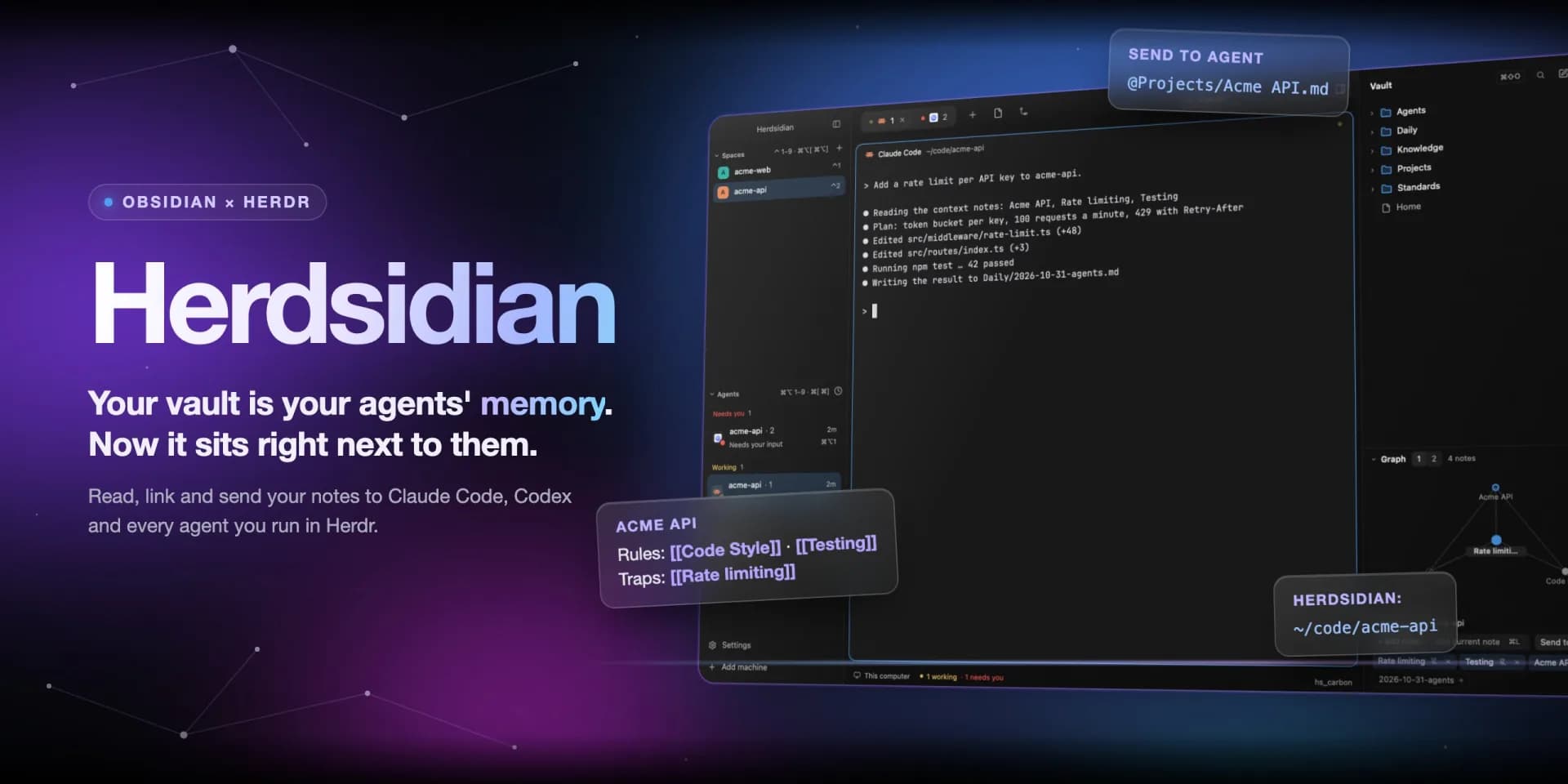
So I wanted a layout that fits that way of working: the agents and the notes in the same window, the notes one key away. The interface is files, so I built it.
What Herdsidian does
Herdsidian is a Herdr layout with seven mods and eight themes, MIT licensed and on GitHub. Six of the mods are restyled copies of Herdr's own, which is the clone rule in practice. The seventh is the Notes sidebar.
The loop goes like this:
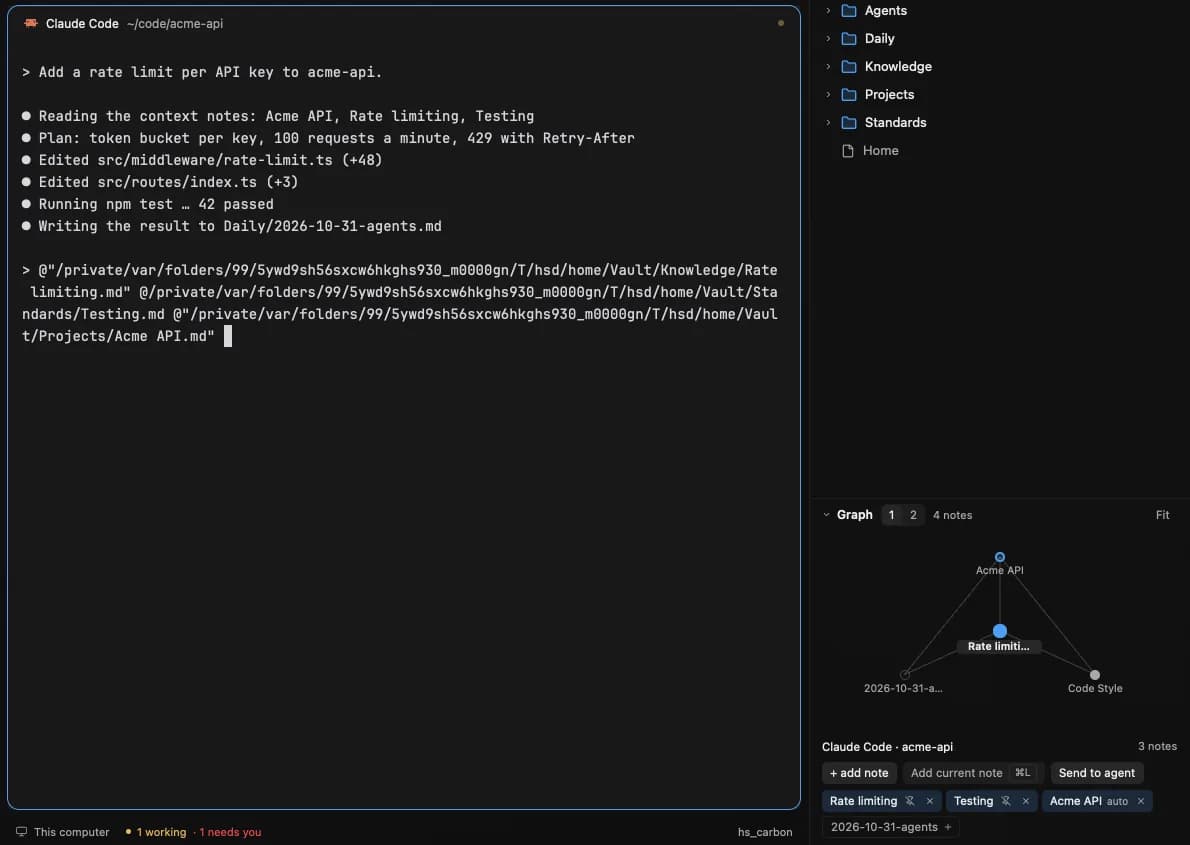
- Open a note in the sidebar. You read and edit it next to your terminals, and
[[wikilinks]]open the note they point to. - Press
⌘Lto link it to the agent's space. A local graph shows its neighbors one or two hops away, like the standards it cites and the traps it warns about. - Click Send to agent. The linked paths land in the agent's prompt, as
@pathfor Claude Code and the plain path for other agents. It never presses Enter, so you read the prompt before it goes. - Let the agent write back. If it changes a note you have open, your save asks first: Reload or Overwrite.
It does not replace Obsidian. Renaming, deleting and new folders stay there, and Obsidian, git and your agents all see the same files. Any folder of Markdown works, so you do not even need Obsidian.
I built and tested it on macOS. Linux should work but is untested, and Windows is not supported.
To try it, ask your agent from a Herdr terminal:
Read ~/.config/herdr-app/AGENTS.md, then add this layout: herdr.dev/layouts/anderssonq/herdsidianWhat changed for me was where my notes live: next to my agents. Herdr's site suggests your Linear issues next to your agents, or a git graph of the repo you are in. If your tools were files your agent could edit, what would you change first?